Arduino Light Sensor - TSL2561 and Experiments with Infrared and Visible Light
Albert Einstein won his Nobel Prize in Physics in 1921 "for his services to Theoretical Physics, and especially for his discovery of the law of the photoelectric effect" [nobelprize.org]. The photoelectric effect, in part, describes the energetic response from photons and electrons regarding the interaction between light and materials. A photodiode is a device that employs this effect to proportionally measure light as a function of electricity. Photodiodes are used in cameras, smartphones, remote controls, heat sensors, and many other applications. Here, we investigate the TSL2561 luminosity sensor that uses two photodiodes: one in the visible spectrum and one in the infrared spectrum. The goal with the TSL2561 is to demonstrate its responsivity to particular wavelengths (colors) within the electromagnetic spectrum.

Albert Einstein, 1921
The Human Eye and The Electromagnetic Spectrum
The human eye's retina sees by way of cells called photoreceptors. The two primary photoreceptors, rods and cones, allow the eye to see under both dark and bright conditions. The cones resolve bright light and give humans the ability to see colors with wavelengths from 400nm - 700nm (blue to red) [source 1, source 2]. In Table 1, the division of color by wavelength for the visible spectrum is shown.
There three types of cones in the retina: type-S (short wave, blues), type-M (medium wave, greens), type-L (long wave, reds). Figure 1 shows the perceived response of each cone and their relevance to the visible spectrum.
![Table 1: Division of colors by wavelength [source].](https://images.squarespace-cdn.com/content/v1/59b037304c0dbfb092fbe894/1524332692810-KJ5R5G4AOB2AW5Y9XJAA/visible_spectrum_table.png)
Table 1: Division of colors by wavelength [source].

Figure 1: Human Eye Cone Responses
Understanding the behavior of each photoreceptor cone gives scientists and researchers the ability to study and approximate the response of the human eye. The normalized cone responses shown above are typical for an average human retina. The peaks and widths of each curve allow technology companies to build sensors that measure light in a similar manner. Thus, we have devices such as the TSL2561, which measures light roughly in the visible spectrum. Normally, photodiodes experience interference due to the ubiquity of infrared radiation, however, the TSL2561 overcomes this by including an entirely separate photodiode with a peak response in the infrared. This allows the infrared cross-talk to be algorithmically subtracted from the visible measurement to create a more accurate depiction of how much light a human may be perceiving.
Parts List and Experimental Procedure
I will be testing the response of the TSL2561 luminosity sensor by using six LEDs of various wavelengths: infrared (940nm), red (620nm), yellow (580nm), green (520nm), blue (460nm), and white (around 550nm, though it's more broadband). Using these six bands I will be able to verify the responsivity shown in Figure 2 (taken from the datasheet).
I will be using the following parts to conduct the experiment:

Figure 2: Responsivity of the TSL2561 luminosity sensor. In the experiments below, I will be testing this curve using six LEDs of varying wavelength.

Figure 3: Setup of experimental procedure where I measure the visible and infrared signals from each LED.
The experimental procedure will go as follows:
Wire each LED to the circuit
Measure visible and infrared values from the TSL2561
Evaluate Ratio of Visible/Infrared
A photo of my setup for the experiment can be seen in Figure 3.

Figure 4: Photo showing both photodiodes on the TSL2561

The TSL2561 SparkFun Library and Arduino Wiring and Code
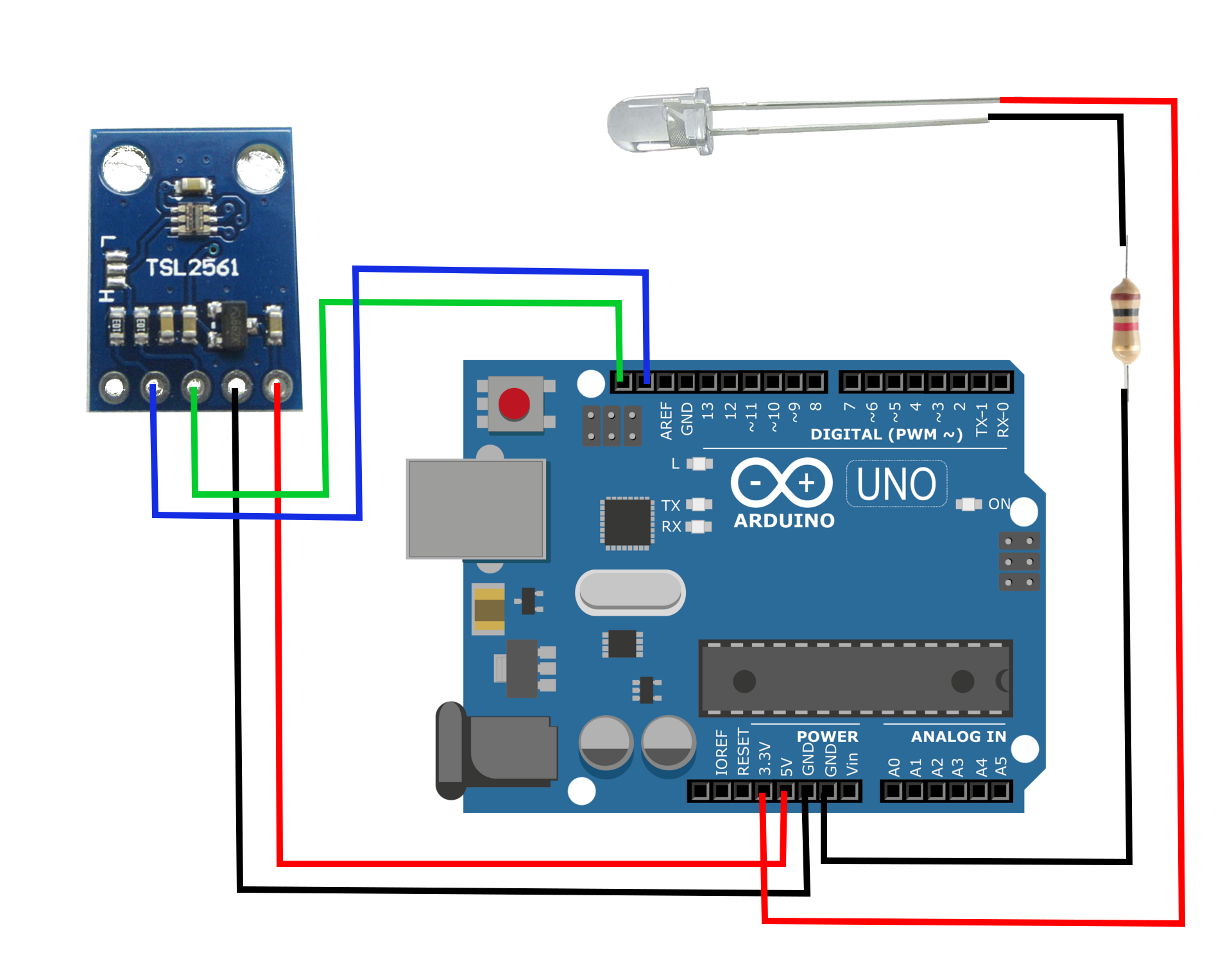
Figure 5: TSL2561 Wiring to Arduino
Arduino | TSL2561
5V | VCC
GND | GND
SCL | SCL
SDA | SDA
I will be using a modified version of the SparkFun example where I only use the raw values measured from the sensor, as opposed to the 'lux' values calculated by the library. The raw values will allow us to compare the visible and infrared light measured by each photodiode. By calculating the ratio between visible and infrared light, we can discern where the light falls on the spectrum based on the response of each photodiode shown in Figure 2. My Arduino code for calculating visible, infrared, and the ratio between the two can be found below:
#include <SparkFunTSL2561.h>
#include <Wire.h>

// Create an SFE_TSL2561 object, here called "light":
SFE_TSL2561 light;

// Global variables:
boolean gain;     // Gain setting, 0 = X1, 1 = X16;
unsigned int ms;  // Integration ("shutter") time in milliseconds

void setup()
{
  // Initialize the Serial port:
  Serial.begin(9600);
  light.begin();

  // If gain = false (0), device is set to low gain (1X)
  // If gain = high (1), device is set to high gain (16X)
  gain = 1;

  // If time = 0, integration will be 13.7ms
  // If time = 1, integration will be 101ms
  // If time = 2, integration will be 402ms
  // If time = 3, use manual start / stop to perform your own integration
  unsigned char time = 2;

  // setTiming() will set the third parameter (ms) to the
  // requested integration time in ms (this will be useful later):
  light.setTiming(gain,time,ms);

  // To start taking measurements, power up the sensor:
  light.setPowerUp();
}

void loop()
{
  delay(ms);
  // Retrieve the data from the device:
  unsigned int visible, infrared;
  float vis,ir

  if (light.getData(visible,infrared))
  {
    // getData() returned true, communication was successful
    Serial.print("Visible: ");
    Serial.print(visible);
    Serial.print(" Infrared: ");
    Serial.print(infrared);
    vis = float(visible);
    ir = float(infrared);
    Serial.print(" Ratio (Vis/IR): ");
    Serial.println(vis/ir);
  }
  else
  {
    // getData() returned false because of an I2C error, inform the user.
    byte error = light.getError();
    Serial.print("I2C error: ");
    Serial.println(error);
  }
}
Experimental Results
The table below shows the calculated ratios between visible and infrared light for each LED. The trend in the data can easily be deduced, and the physical significance of this trend is obvious and expected. Since the two photodiodes peak at different wavelengths, the visible around 650nm and the infrared around 800nm, we are able to utilize their ratio and relate it to the wavelength of light being emitted. Therefore, it can be concluded that under controlled conditions, the TSL2561 is capable of discerning the color of each LED with only a measure of emission.
| LED | Ratio (Visible/Infrared) |
|---|---|
| IR (940nm) | 1.3 |
| Red (620nm) | 5.8 |
| Yellow (580nm) | 9.3 |
| White (~550nm) | 16.8 |
| Green (520nm) | 25.6 |
| Blue (460nm) | 95.8 |

I conducted a polynomial fitting of the data after casting the ratios as a function of the natural logarithm. This accounts for the exponential profile of the two photodiode responses. I then plotted the fit against the data and acquired a nice expression for approximating the wavelength as a function of the measured ratio of visible light to infrared light detected by the TSL2561 luminosity sensor.

With the fit above, I was able to replicate the data with near-perfect accuracy. This means that we can insert the polynomial fit (and exponential inversion) into Arduino and actually re-do the experiment and blindly be able to determine the color of a given LED. This type of result could have massive implications in applications involving color recognition.
Conclusion
In the experiment executed above I demonstrated the effectiveness of a pair of photodiodes using the TSL2561 luminosity sensor. Using the Arduino Uno, I was able to calculate the ratio between the visible and infrared light emitted by LEDs of varying wavelengths. The results indicate that the TSL2561 is capable of distinguishing between colors based on the measured ratio between the photodiodes. This outcome has broad implications for makers interested in the TSL2561 as a light sensor and color detector. The experiment is also educational for students interested in learning about the photoelectric effect and how the human eye perceives light and colors. Obviously, complications can arise when dealing with light being emitted from multiple locations and direction, and therefore, the conclusions drawn above cannot necessarily be extrapolated to every situation.
Products from our Shop relevant to this project:
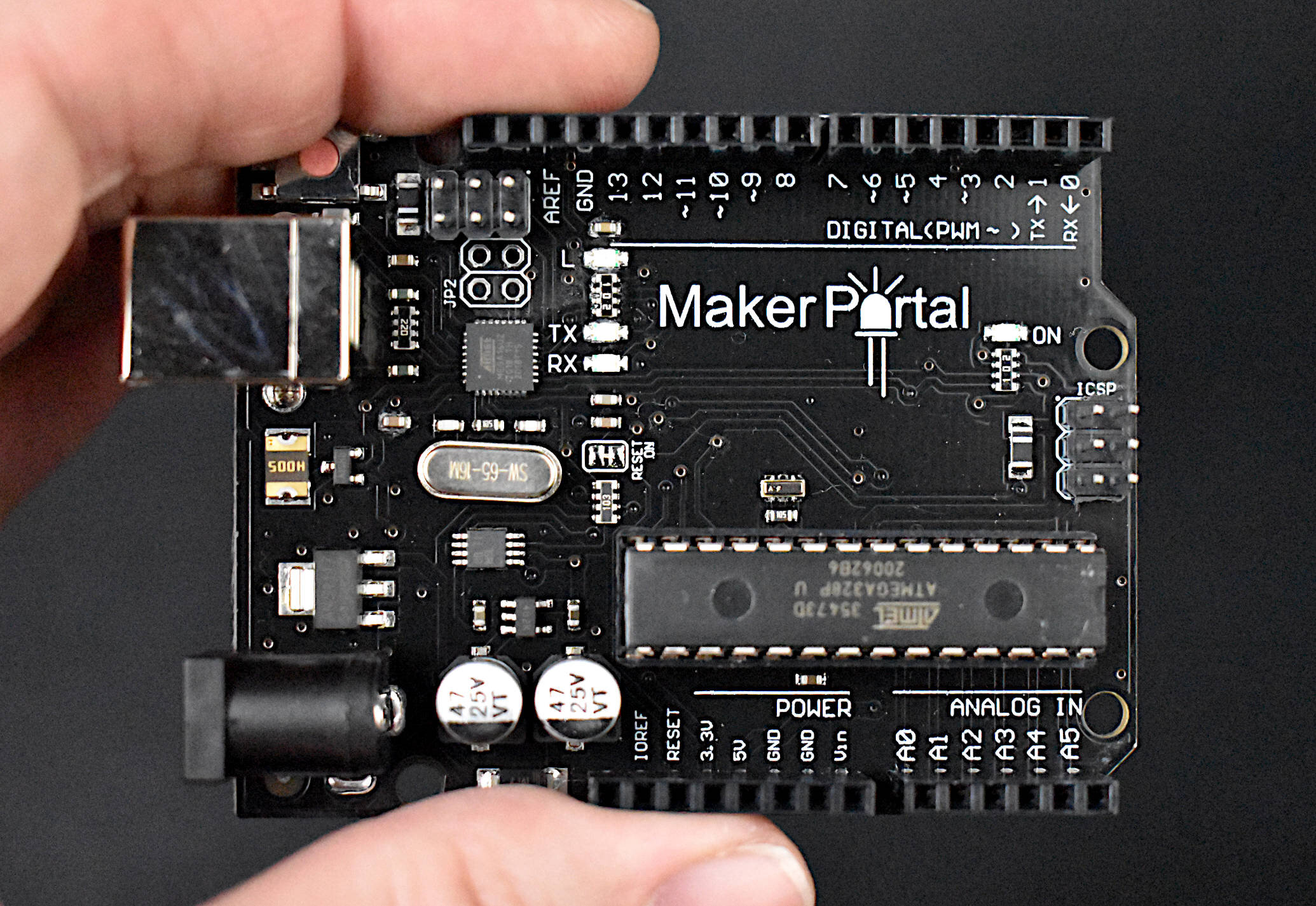
The Maker Portal Uno board is the centerpiece of many of the projects carried out in our maker spaces. The Uno board is capable of reading a wide range of sensors using analog-to-digital conversion, SPI, I2C, UART, and other common protocols. The Uno board can be used to control motors, OLED/LCD displays, and LEDs. The Arduino Uno board shown here is the official Maker Portal microcontroller, which we use in many of our projects!
Included in the Arduino Uno Package:
Maker Portal Arduino Uno Rev3 Board
Black USB Cable (1m in Length)
Specifications for Arduino Uno Rev3 Board:
ATmega328P chip with Arduino Bootloader
14 digital pins, 6 analog pins
10-bit analog-to-digital converter (ADC)
5V-12V Supply Tolerance
3.3V and 5.0V output pins
16 MHz clock
5 PWM pins, I2C support, SPI support , UART support
ATmega16U2 USB TTL, compatible with Linux, Windows, and Mac
Black Stylish Finish
Fully Integrated with Arduino IDE software
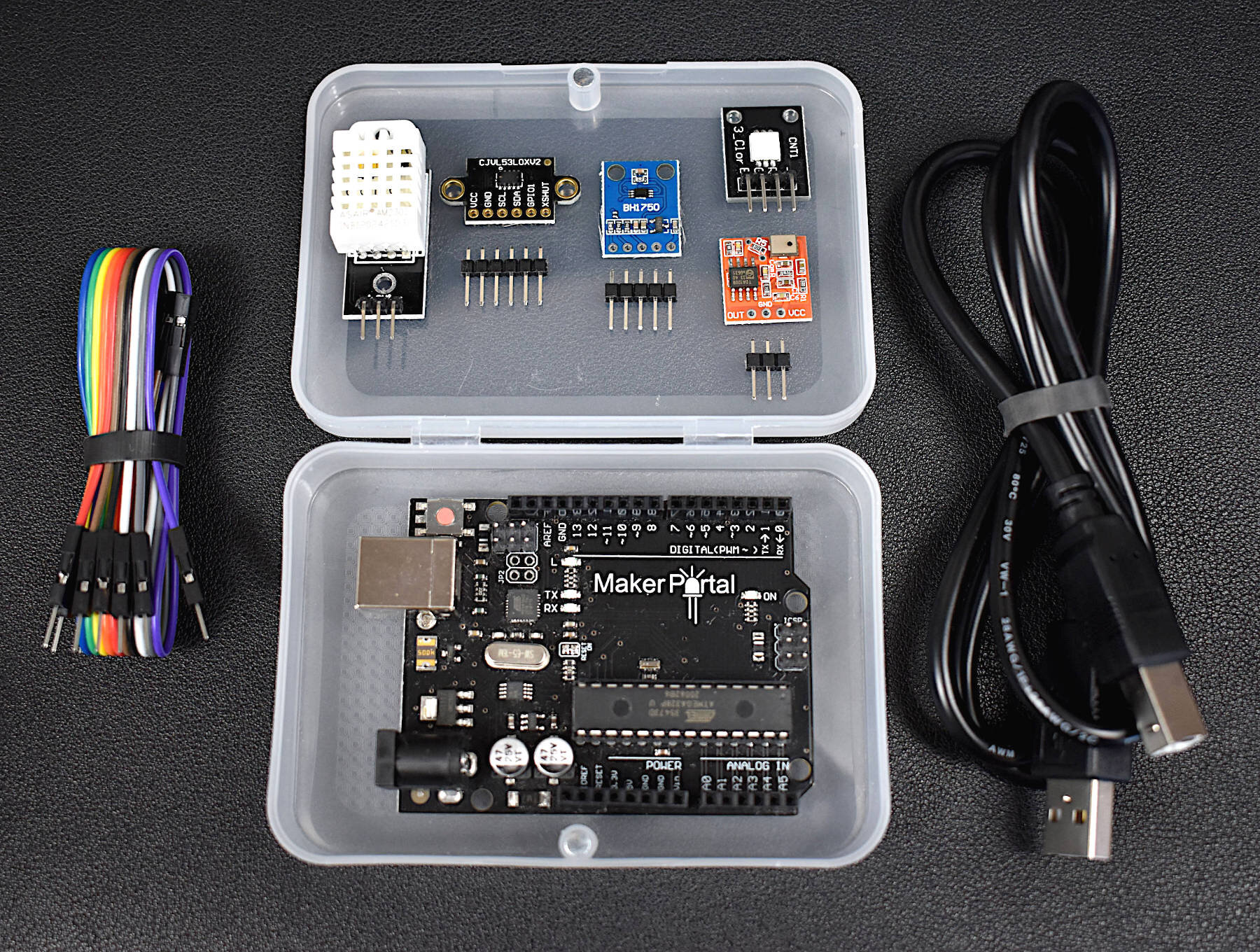
This Arduino starter kit has been tailored directly to engineers interested in real-world applications involving sensors. We avoided many of the out-of-date sensors that often accompany Arduino kits and targeted several relevant and interesting areas of engineering: temperature and humidity sensing, infrared time-of-flight distance sensing, and visible spectrum light intensity detection, and MEMS microphone audio sensing. In conjunction with these sensors, the kit also comes with an Arduino Uno microcontroller, jumper wires for connecting the sensors, an RGB LED indicator, and plastic component enclosure.
Included in the Arduino Starter Kit for Engineers (Sensor Suite):
1x Maker Portal Arduino Uno Board
1x BH1750 Light Sensor
1x DHT22 Temperature and Humidity Sensor
1x VL53L0X Time-of-Flight Distance Sensor
1x MEMS Microphone
1x RGB LED
10x Male-to-Female Jumper Wires
1x Plastic Component Box
1x USB 2.0 Cable for Arduino
Features of the Arduino Starter Kit for Engineers (Sensor Suite):
Detect light, temperature, humidity, distance, and sound
All sensors have easy-to-use Arduino-compatible libraries
The kit fits snugly into the component box, excluding the USB cable
Each sensor has a real-world application for prototyping in topics ranging from: environmental monitoring, industrial engineering, obstacle avoidance in robotics, home automation, and more!
Component Specifications:
-Specifications for the Arduino Uno Board:
ATmega328P chip with Arduino Bootloader
14 digital pins, 6 analog pins
10-bit analog-to-digital converter (ADC)
5V-12V Supply Tolerance
3.3V and 5.0V output pins
16 MHz clock
5 PWM pins, I2C support, SPI support , UART support
ATmega16U2 USB TTL, compatible with Linux, Windows, and Mac
Black Stylish Finish
Fully Integrated with Arduino IDE software
-Features of the BH1750 Light Sensor:
3.3V - 5.0V Input Voltage
16-bit ADC: 1 - 65535 lx Range
8-60Hz Sample Rate
I2C 2-Wire Communication Protocol
Supply Current - 120 µA, Power-down Current 0.01 µA
Peak Current - 7mA
400nm - 700nm Wavelength Response
-Features of the DHT22 Temperature Sensor:
3.3-6V Supply Voltage
Operating ranges:
Relative Humidity: 0-100 %
Temperature -40 °C to 80 °C
Sample Rate ~ 2 seconds
Sensitivity:
Relative Humidity: ± 0.1 %
Temperature: ± 0.1 °C
Accuracy (Drift and calibration errors):
Relative Humidity: ± 2-5 %
Temperature: ±0.5 °C
-Features of the VL53L0X ToF Sensor:
3.3V Supply Voltage
<20 mA consumption
50mm - 1.2m range (default mode), 50mm - 2.2m range (long range mode)
5 Hz - 33 Hz Sample Rate
I2C Compatible with Arduino, Raspberry Pi
Class I Infrared Laser (safe under all conditions)
-Features of the Analog MEMS Microphone:
3.0V-7.0V Supply Range
-42dBV/Pa Sensitivity
59dBA Signal-to-Noise Ratio (SNR) @ 1kHz
16mm x 15mm x 3.1mm Module Dimensions
4.72mm x 3.76mm MEMS Microphone Dimensions
100Hz - 10kHz Frequency Range (within 4dB)
3mA - 10mA Average Consumption
SPM0404HD5-PB MEMS Microphone Datasheet

Included:
1x Mini Breadboard
Breadboard Specs:
2 divisions of 5x17 holes (85 ties)
Great for smaller projects with Arduino Micro, NodeMCU, Particle, Arduino Xiao, sensors and more!

The BH1750 is a 16-bit ambient light sensor that is centered around the visible spectrum, designed to communicate via the I2C protocol. Perfect for Arduino or Raspberry Pi, the BH1750 can be used in security applications ranging from camera shutter control, brightness control in dark/lit rooms, and general monitoring of light in the visible spectrum.
Included in the BH1750 Ambient Light Sensor Package:
1x BH1750 Ambient Light Sensor
1x 5-Pin Header
Some Features of the BH1750:
3.3V - 5.0V Input Voltage
16-bit ADC: 1 - 65535 lx Range
8-60Hz Sample Rate
I2C 2-Wire Communication Protocol
Supply Current - 120 µA, Power-down Current 0.01 µA
Peak Current - 7mA
400nm - 700nm Wavelength Response
Datasheet here.
See more in Arduino and Physics: